



Does the 2026 Mazda CX-5 Google built-in work without your phone near Milwaukee, WI?
Russ Darrow Mazda of Greenfield – Does the 2026 Mazda CX-5 Google built-in work without your phone near Milwaukee, WI?
For many shoppers visiting us at Russ Darrow Mazda of Greenfield, the most practical tech question about the all-new 2026 Mazda CX-5 is whether its available Google built-in system can handle everyday driving tasks without plugging in a smartphone. The short answer: you can do a lot right from the CX-5’s new available 15.6-inch integrated touchscreen — and we’ll show you exactly how that plays out on real roads around Milwaukee, WI.
Before we dig in, a quick primer on what’s new. The third-generation 2026 Mazda CX-5 brings a bigger, more comfortable cabin, standard i-ACTIV AWD®, and a thoughtfully reworked interior centered around intuitive technology. With Google built-in, you can access Google Maps, the Google Play Store, and voice control — with Google Gemini (an AI assistant from Google) coming soon to cars with Google built-in — all designed to feel familiar the first time you use it. Internet connection and compatible operating system are required for certain features, and availability may vary by device, country, and language. Google, Google Maps, and Google Play are trademarks of Google LLC.
Why Milwaukee-area drivers ask about driving without a phone
Daily life from Bay View to Wauwatosa often means quick hops on I-94 or the Zoo Interchange, pickup runs along South 27th Street, and weekend detours to the Public Market or American Family Field. Many of you prefer to leave your phone in a bag, use Do Not Disturb, or keep cables out of sight. Others rely on a passenger’s hotspot or want dependable navigation in parking structures by Fiserv Forum — places where a phone’s GPS can get spotty. The 2026 CX-5’s Google built-in is set up to keep you moving even when your phone stays in your pocket.
So what works natively, and what still benefits from your phone or a data connection? Here’s the breakdown our team walks through during test drives.
What you can do in the CX-5 with and without a phone
- Navigation without a phone: Use Google Maps directly on the CX-5’s touchscreen. Download offline maps for Milwaukee, WI and your usual routes to keep turn-by-turn directions and place search working even when connectivity drops.
- Personalized places without a cable: When you sign in with your Google Account, your Saved Places — from the office near the Historic Third Ward to your favorite coffee spot on Brady Street — appear in the vehicle.
- Voice control on the go: You can speak naturally to set a destination, call a contact, or adjust certain settings without memorizing commands. Select features may require an internet connection for full functionality.
- Apps in the vehicle: The Google Play Store offers a curated selection of compatible in-vehicle apps. Streaming and some content may require a data connection and may be limited to when the vehicle is parked.
- Using your phone’s hotspot: If you prefer not to add any in-vehicle data service, you can tether to a passenger’s or your own phone hotspot to refresh traffic data, stream, or download updates.
- Going fully phone-free: For everyday drives across Milwaukee County, having offline maps downloaded and signing into your Google Account will cover navigation and saved destinations even if your phone stays home.
Because the CX-5 integrates these tools at the system level, everyday tasks feel consistent. You tap, swipe, and search similarly to how you do on a tablet, but with a layout optimized for driving focus.
Quick setup steps we’ll walk you through at our showroom
Getting started is simple — and we’re happy to set this up for you during delivery so it’s ready for your first commute from Greenfield to downtown.
- Power on the 2026 CX-5 and open the main Apps pane on the 15.6-inch touchscreen.
- Sign in to your Google Account to sync saved places and preferences.
- Open Google Maps, set Home and Work, and download offline maps for Milwaukee, WI and any frequent destinations like Brookfield or Racine.
- Customize the home screen with your most-used tiles — Maps, Phone, and your go-to audio app.
- Enable voice control and practice a few natural phrases, such as “Navigate to the Milwaukee Public Market.”
- Connect to a hotspot if you want live traffic updates, app downloads, and over-the-air enhancements.
If you’d rather keep accounts separate, we can set up multiple driver profiles so each person’s layout and preferences load automatically.
Real-world scenarios around Milwaukee where Google built-in helps
When traffic stacks up on the Marquette Interchange, live rerouting in Google Maps can save time. If you’ve pre-downloaded offline maps, the system still provides guidance even if a data connection blips as you dip under an overpass or pull into a garage on Kilbourn Avenue. Heading to a new soccer field in Franklin? Say the name aloud and let Maps handle the rest instead of thumbing your phone.
Parking in the Third Ward often means navigating tight structures. The CX-5’s wider-opening doors and lower cargo lift-in height make loading a stroller or market haul easier once you’ve parked — and with your phone stowed, you can rely on the built-in interface to pull up your next stop, hands-free.
Longer weekend drives — say, a day trip up I-43 — are a great time to download offline coverage for counties north of Milwaukee. You can also add waypoints by voice, which is convenient if you decide to stop in Port Washington on the fly.
Beyond tech — what else supports seamless ownership
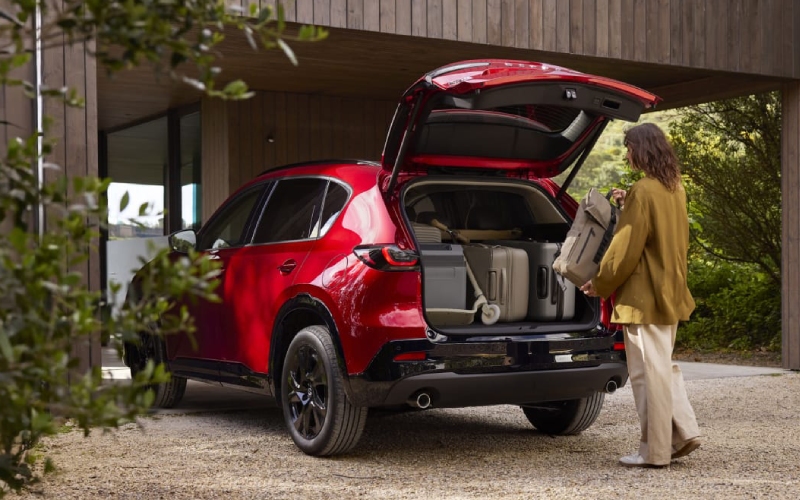
The 2026 CX-5 brings more than a powerful infotainment update. A larger cabin with increased rear leg, knee, and headroom makes it easier for adults to stretch out or for parents to handle buckles without contorting. Larger door openings simplify loading as well. The cargo area is almost two inches longer and over an inch higher than before, with a lower lift-in height that drops by over half an inch — perfect for grocery runs along South 27th Street or packing sports gear for Whitnall Park.
On the move, the recalibrated 2.5-liter Skyactiv-G four-cylinder engine delivers 187 horsepower and 186 lb-ft of torque through a 6-speed automatic transmission with standard i-ACTIV AWD®. It’s a balanced setup for confident accelerations onto I-94 and steady traction when roads are slick or uneven. Mazda’s commitment to safety also remains strong, with a robust suite of standard and available driver assistance technologies, and a legacy of IIHS Top Safety Pick+ performance.
Put simply, the tech works hand in hand with the driving feel. Even if you never plug in a phone, the CX-5 is designed to reduce friction from your first mile.
Tips from our product specialists for a smoother tech experience
Our team has helped hundreds of drivers set up connected features. A few pro tips make daily life easier:
- Use profiles: Create a profile for each driver so Maps, audio apps, and shortcuts stay personal without extra taps.
- Plan for low-signal areas: Download offline maps around Fiserv Forum, the lakefront, and your parking garages so navigation never skips a beat.
- Keep voice simple: Speak naturally — “Find coffee near the Milwaukee Art Museum” — and let the system handle the query.
- Curate your apps: Install only what you use weekly to keep the home screen clean and distraction low.
- Ask us for updates: We’ll check for software updates during service visits so you have the latest features and improvements.
Whether you prefer a minimalist setup or want every compatible app at your fingertips, we tailor delivery to your comfort level and walk you through the first week’s must-knows.
If you’re comparing vehicles and wondering how the CX-5’s system stacks up, the key advantage is how familiar it feels — especially if you already use Google services. The larger, integrated display and intuitive layout reduce the learning curve so you can focus on the drive, not the manual.
The bottom line for Milwaukee-area drivers: the 2026 Mazda CX-5’s Google built-in can shoulder core tasks — navigation, voice control, and access to personalized places — even when your phone stays untouched. Add a hotspot or an in-vehicle data connection, and you unlock real-time traffic, app downloads, and more robust voice capabilities. Either way, you’ll enjoy a clean, cable-free experience that complements the CX-5’s calm, functional interior.
We invite you to visit Russ Darrow Mazda of Greenfield to experience the 2026 CX-5 in person. We’ll set up your profile, download Milwaukee offline maps, and send you on a route that mirrors your daily drive — from local streets to a quick highway merge — so you can see how seamlessly it all works without reaching for your phone.
Frequently Asked Questions:
Can I navigate around Milwaukee without plugging in my phone?
Yes. With Google built-in on the available 15.6-inch display, you can run Google Maps natively. Download offline maps for Milwaukee, WI and your frequent routes, and you’ll have turn-by-turn guidance even if your phone is off or no data connection is available.
Do I need a data plan for live traffic and app downloads?
Live traffic, app downloads, and some voice features require an internet connection. You can connect the vehicle to a phone hotspot or an available in-vehicle data connection. Offline maps help keep navigation working when data is unavailable.
Will my Saved Places show up in the CX-5?
When you sign in to your Google Account in the vehicle, your Saved Places and recent searches appear in Google Maps, which is helpful for quick trips to your usual destinations across Milwaukee County.
Can I use voice control without memorizing commands?
Yes. The system is designed for natural language. You can say things like “Navigate to the Milwaukee Public Market” or “Call home.” Select features may require an internet connection for full functionality.
What if I share the CX-5 with another driver?
Create separate driver profiles. Each profile can maintain unique layouts, recent destinations, and app preferences so both drivers get a personalized experience every time.
Is Google Gemini available in the vehicle today?
Google Gemini — an AI assistant from Google — is coming soon to cars with Google built-in, per Mazda. Availability and feature timing may vary.
Ready to see how this all comes together without a phone plugged in? Stop by Russ Darrow Mazda of Greenfield — we’ll get you set up and out on the road so you can experience the 2026 Mazda CX-5’s intuitive tech and confident drive where it matters most: your everyday routes in and around Milwaukee, WI.
0 comment(s) so far on Does the 2026 Mazda CX-5 Google built-in work without your phone near Milwaukee, WI?