



Can you remote start a 2026 Mazda CX-30 from your phone near West Allis, WI?
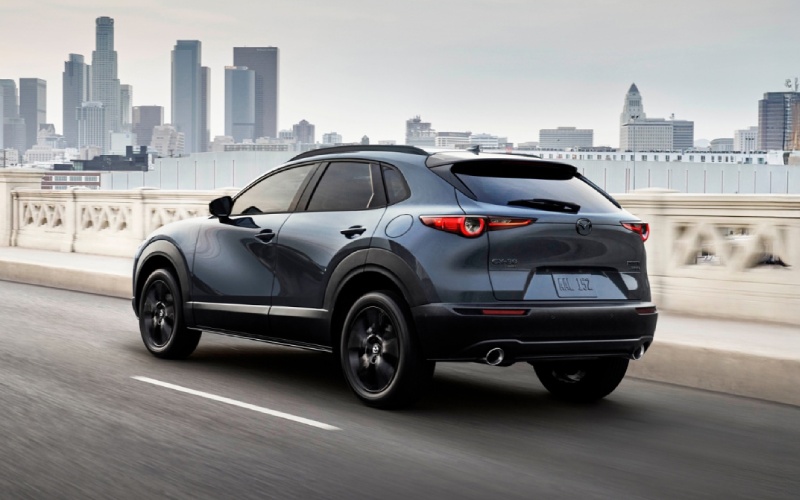
Russ Darrow Mazda of Greenfield – Can you remote start a 2026 Mazda CX-30 from your phone near West Allis, WI?
The 2026 Mazda CX-30 makes everyday life easier with thoughtful tech, and one feature in particular tends to spark interest among shoppers near West Allis — remote engine start you can control from your phone. If you’re comparing compact SUVs for early morning commutes on I-894, quick grocery runs along Highway 100, or street parking around State Fair Park, being able to start your CX-30 from a distance is a real quality-of-life upgrade. As your local team at Russ Darrow Mazda of Greenfield, we’ll explain how it works, what you need, and how it fits the way people actually drive and park around West Allis.
Here’s the bottom line up front: the 2026 Mazda CX-30 supports remote engine start through Mazda Connected Services using the MyMazda App, and the service is complimentary for one year. That means you can use your smartphone to start the engine, check basic status reports, and more — all designed to help you head out with a little extra ease and confidence.
How remote start works on the 2026 Mazda CX-30
Mazda Connected Services lets you interact with your vehicle remotely via the MyMazda App. For the CX-30, that includes the ability to remotely start the engine so the cabin can begin to reach your previously used climate settings before you walk out the door. Whether your CX-30 is on a residential side street in West Allis, in a shared garage near Greenfield Avenue, or across a large lot at the West Allis Farmers Market, you can confirm the vehicle status and start the engine from your phone.
Because this feature uses a cellular connection, you don’t need to be within Bluetooth range. You simply need an active Connected Services account, adequate mobile signal on your phone, and your CX-30 must be in the proper, secure state to accept the command. Our product specialists can demonstrate the app in our showroom so you can see exactly how the process looks on-screen before you take delivery.
What you need to use remote start
Most West Allis shoppers ask the same follow-up questions: What do I need, and how long does it take to set up? The good news is that setup is straightforward and can be completed from your driveway or kitchen table.
Here is a simple step-by-step overview so you can plan ahead. When you pick up your CX-30, our team can walk you through this in person and help with any login or pairing questions.
- Create or sign in to a MyMazda App account: Download the MyMazda App to your iOS or Android device and create your secure login or sign in if you already have an account.
- Add your CX-30 using its VIN: The app will prompt you to enter or scan your Vehicle Identification Number to link your 2026 Mazda CX-30.
- Activate Mazda Connected Services: Follow the in-app prompts to enable services — the first year is complimentary.
- Verify ownership and complete pairing steps: The app will walk you through simple verification and confirmation to complete activation.
- Test the remote start command: From the home screen, you’ll see the remote start control. Use it once while you’re near the vehicle to confirm everything is working as expected.
That’s it — once you’re connected, you can use remote start and view status reports from virtually anywhere you have data service on your phone.
How this feature fits everyday life near West Allis
Remote start isn’t just a novelty. Around West Allis and the greater Milwaukee area, it solves little frictions that add up over a week of driving. If you park on S 84th Street or in a surface lot off National Avenue, remote start lets you get the CX-30 ready while you’re still wrapping up at the office or strapping in kids at the front door. If you’re loading groceries near Highway 100, it’s nice to get the cabin welcoming while you return the cart. And if you share a garage or park at State Fair Park for an event, starting the engine from a distance means you can time your departure without adding a detour back to the vehicle.
Better still, Mazda pairs this convenience with confidence-building engineering. The 2026 Mazda CX-30 features standard i-Activ AWD® for surefooted traction and the i-Activsense® suite of safety features to help alert you to hazards and improve visibility. That means when you tap start on your phone, you’re heading to a crossover that’s built to keep you feeling in control once you’re on the move.
Inside, the available technologies are equally helpful after you’ve started the vehicle. Apple CarPlay® and Android Auto™ integration keep your route and playlists one tap away, while available Alexa Built-in lets you connect to maps, climate control, and music with your voice so you can focus on the road. If you enjoy a richer sound, the available Bose® 12-speaker system with Centerpoint® and AudioPilot® can turn daily errands into something you look forward to.
Pro tips from our local team for smooth remote-start use
We’ve helped many Greenfield and West Allis customers set up remote features on their Mazdas. These quick tips can make your experience even better from day one.
- Enable notifications: Turn on app notifications so you can confirm commands and see vehicle status at a glance.
- Check your phone’s signal: Remote commands rely on data — a quick glance at your bars saves time if you’re in a low-signal spot.
- Use consistent climate settings: Set your preferred A/C or heat before you shut down, so the cabin begins moving toward that comfort level after a remote start.
- Know the basics of vehicle state: For safety, remote start works only when the CX-30 is in the proper secure condition — our delivery specialists will show you the exact indicators to look for.
- Keep the app updated: App and system updates often add refinements — enable auto-updates on your phone for a seamless experience.
If you’d like hands-on help, our team at Russ Darrow Mazda of Greenfield can install the MyMazda App on your device, verify your account, and run a test command together before you drive home.
While you’re exploring connected tech, we also recommend checking out the features available on specific trims. For example, select models offer a 360° View Monitor that can help with tight parking near West Allis shops and restaurants, and the available windshield-projected Active Driving Display keeps key information in your line of sight on I-41 and I-894 transitions. We’ll help you compare options and choose the CX-30 that fits your routine.
Of course, technology is most enjoyable when you know it’s supported long term. Our service department in Greenfield is staffed by factory-trained technicians and uses genuine Mazda parts. We offer convenient hours, flexible transportation options, and a friendly walkthrough if you ever want to re-pair your phone, review MyMazda App features, or explore accessories like roof racks or all-weather mats that match your lifestyle.
From agile handling and available SKYACTIV®-G 2.5 Turbo power to the confidence of i-Activsense®, the 2026 Mazda CX-30 is engineered for everyday ease — and remote start is one more way it smooths out your day. If you’re shopping near West Allis, we invite you to stop by our showroom on S 108th Street. We can demo remote commands, show you how Alexa Built-in works in the cabin, and set up your MyMazda App so you’re ready the moment you take the keys.
Frequently Asked Questions:
Does the 2026 Mazda CX-30 include remote start from the factory?
Remote engine start is enabled through Mazda Connected Services using the MyMazda App. The app-based service is complimentary for one year on the 2026 Mazda CX-30, and we’ll help you activate it at delivery.
Do I need to be near the vehicle for remote start to work?
No. Because the feature uses a cellular connection, you can be across town and still send the command — you just need data service on your phone, and your CX-30 must be in the proper secure state to accept the request.
Will remote start also adjust my climate settings?
Remote start allows the cabin to begin moving toward comfort before you get in. For best results, set your preferred climate settings when you park — that way, when you use remote start via the app, the CX-30 can begin to reach those settings.
Which trims support Mazda Connected Services on the CX-30?
Connected Services capability is designed for the CX-30 lineup, with features like remote start and vehicle status reports available through the MyMazda App. We’ll review exact features by trim when you visit, and help you test what matters most to you.
Can I also use voice control inside the vehicle?
Yes. The 2026 Mazda CX-30 offers available Alexa Built-in, which lets you connect to maps, climate control, music, and more using your voice while you’re in the cabin. It’s a helpful complement to app-based remote features.
What if I change phones or need help with the app later?
Visit Russ Darrow Mazda of Greenfield anytime. Our team can assist with reinstallation, sign-in, and reconnecting your CX-30 to MyMazda. We’re happy to run a quick test with you to confirm everything is working.
Ready to see the 2026 Mazda CX-30 and try a live demo of remote start? Visit Russ Darrow Mazda of Greenfield — just minutes from West Allis — and we’ll help you compare trims, set up the MyMazda App, and take a confident test drive. Our goal is simple: make your daily drive easier, more connected, and more enjoyable from day one.
0 comment(s) so far on Can you remote start a 2026 Mazda CX-30 from your phone near West Allis, WI?